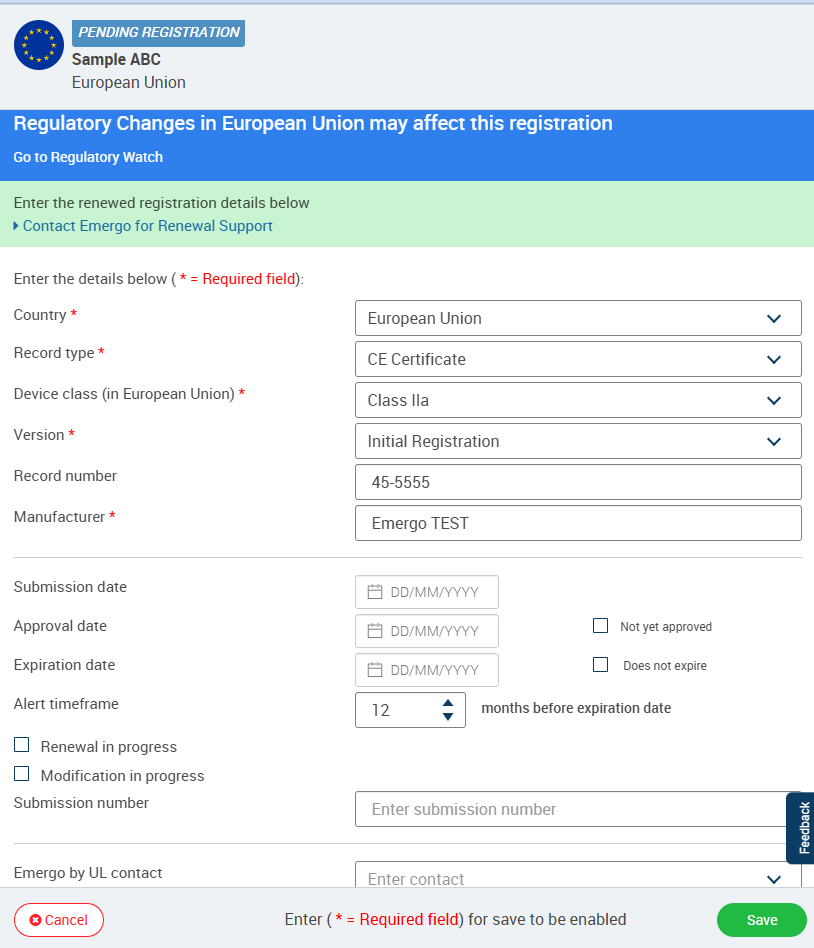
Understanding Record Detail
Rams requires you to enter the following details for every record:
* = Required
Country * - Country or market for a certificate or in which product is registered in.
Record Type * - certificate type (e.g., quality, testing, etc.) or enter "product registration" for medical device registrations.
Product/Record Name * - Identifying name of the registered product or certificate name.
Device Class * - Regulatory classification of the medical device based on risk level and applicable market regulations (for example, Class I, IIa, IIb, III under EU MDR or Class I, II, III under FDA regulations).
Version * - Initial, Modification, Renewal, Transferred, NA
Manufacturer * - The firm that produces the product.
RAMS enables you to also enter the details below for each registration/certificate record. Although these details are optional, entering more information will enable you to find registration or certificate record details more easily.
Record Number - the registration’s or certificate’s unique identifying number provided by the approving regulatory authority.
Submission number - unique number assigned upon submission.
Company contact – the name of the individual at your organization who is responsible for or has prepared the registration or certificate.
Submission date – the date on which the registration or certificate submission was provided to the regulatory authority.
Approval date – The date on which the device registration, license, certificate, or regulatory approval was granted by the relevant authority.
Expiration date – The date on which the regulatory approval, registration, license, or certificate ceases to be valid and requires renewal.
Not Yet Approved - Indicates that the device approval or registration application has been submitted but has not yet been granted by the regulatory authority.
Does Not Expire – Indicates that the approval, registration, or certification remains valid indefinitely unless suspended, revoked, or otherwise modified by the authority.
Renewal In Progress – Indicates that the existing approval is approaching expiration and the renewal application is currently under review by the regulatory authority.
Modification in progress – Indicates that a change request affecting the approved device (such as design, labeling, manufacturing site, or intended use) is currently under regulatory review.
Alert timeframe– the number of months before the expiration date on which the record's status will be set to “Expiring Soon". By default, Rams will set the value to the default alert date set for the registration or certificate country.
Local representative – The authorized local entity or representative responsible for regulatory communications and compliance activities within the target market or country.
Name of Issued body – The regulatory authority, notified body, certification body, or agency that issued the approval, registration, license, or certificate.
Local distributors – the names of companies responsible for distributing the product in the registered country/market. Note: this field can contain multiple distributors. To import a spreadsheet containing multiple distributors in a single registration, separate the distributor names with commas. Issued by- name of issuing body.
Device UDI – the product’s unique device identifier. Device part numbers – the part numbers associated with the devices and accessories that constitute the product. Note: this field can contain multiple part numbers. To import a spreadsheet containing multiple part numbers in a single registration, separate the part numbers with commas.
Device part numbers – Unique manufacturer-assigned identifiers used to distinguish specific device models, variants, configurations, or components.
Configuration – a name or description of the particular combination of devices and accessories that constitute the product. Device type – a descriptive label or term for the registered product (e.g., GMDN term, GMDN number, FDA product code, etc.).
Device hardware version– a unique identifier representing the hardware version included in the registered product.
Device software version – a unique identifier representing the software version running on the registered product.
IFU version – The version number or revision level of the approved Instructions for Use (IFU) associated with the device.
Label version – The version number or revision level of the approved device label currently associated with the registration.
Related records – the names of certificates stored in Rams that are associated with the registration (see Certificates for more information).
Note: A registration can be associated with multiple certificates. If a certificate associated with a registration is nearing expiration, it will also trigger an alert for the registration. Comments– free-text comments about the registration.
Related product – Reference to associated devices, product families, accessories, parent products, or linked registrations that are related to the device.
Device medical code – The regulatory code used to identify the device type according to a market-specific classification system (for example, FDA Product Code, GMDN Code, EMDN Code, or country-specific device code).
Code (Based on device medical code selection) – Automatically populated code details corresponding to the selected Device Medical Code and used for regulatory classification and submission purposes.
Device medical category– The broader medical specialty, functional group, or device category to which the device belongs (for example, Cardiovascular, Orthopedic, Diagnostic, Dental, Surgical Instruments).
Comments – Additional regulatory notes, submission remarks, approval conditions, special requirements, or relevant observations regarding the device registration.
Custom Labels – User-defined tags or identifiers used for internal tracking, reporting, filtering, or categorization of regulatory records.
Attachments – files related to the records (e.g., submission documents, instructions for use, labels, etc.) that are stored in Rams together with the registration details. Note: you can attach multiple files to a registration. The total number of attachments you can include in your account are determined by the subscription plan you have purchased.